

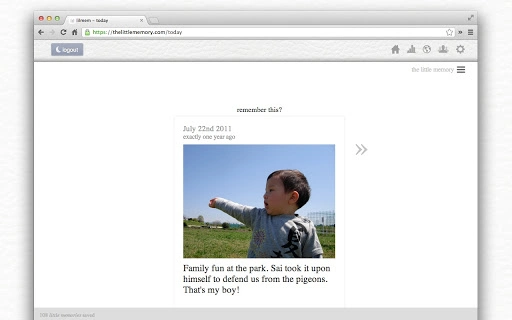
Description
Download little memory – journal, memory app, personal journal, self reflection
Overview
little memory is a thoughtful desktop application designed to help users preserve and reflect on meaningful moments in their lives. Built as a personal memory tracker, it offers a quiet, private space for recording short reflections, emotions, and experiences. The software is ideal for individuals seeking a simple, consistent way to journal without the burden of lengthy entries. It supports daily check-ins, memory tracking across time periods, and the ability to attach photos and locations to entries, creating a rich, personal archive of life’s milestones and small joys.
Target users include reflective individuals, writers, artists, new parents, travelers, and anyone interested in self-improvement and mindfulness. The app encourages regular self-reflection by delivering daily reminders and morning inspiration, helping users maintain a habit of gratitude and introspection. Real-world use cases include tracking personal growth, preserving memories of a child’s first steps, documenting travel experiences, or reflecting on creative processes. The software’s design emphasizes simplicity and emotional resonance, making it accessible for users of all technical skill levels.
The developer did not provide additional details about their background or company. However, the app’s philosophy centers on the idea that meaningful moments often pass unnoticed, and a structured yet gentle tool can help users capture and revisit them. The application’s focus on privacy ensures that all memories remain personal and secure, accessible only to the user unless shared intentionally.
Key Features & Capabilities
- Time-based Memory Review – View what happened in your life a year, month, or week ago, helping you reflect on personal progress and emotional patterns over time.
- Daily Reminders – Receive gentle nudges to record a memory each day, reducing the risk of missing entries and building a consistent journaling habit.
- Media Attachments – Attach photos and locations to memories, enriching entries with visual and spatial context for deeper personal connection.
- Morning Inspiration Notifications – Begin your day with a reminder from your past, drawing motivation from your own words and experiences.
- Private & Secure Storage – All memories are kept confidential, accessible only to the user unless explicitly shared via email, messaging, or social media.
- Memory Insights & Analytics – View word usage trends, emotional graphs, and streaks of consistent journaling to gain insight into your personal journey.
- Sharing & Community Features – Share memories privately with friends or anonymously with a global community, fostering connection and inspiration.
- Export & Backup – Safely export all memories for personal backup, ensuring your data remains under your control.
- Photo Credit Rewards – Earn credits for using the app regularly, which can be used to unlock additional features or benefits.
- Flexible Time Selection – Choose the preferred time frame from which to receive daily memory inspiration, tailoring the experience to your needs.
These features support a range of personal use cases: new parents can revisit early milestones, artists can reflect on their creative process, and travelers can relive their journeys. The app’s structure encourages concise, impactful entries, reducing the barrier to consistent use.
User Interface, Workflow & Performance
The user interface of little memory is minimalistic and intuitive, prioritizing clarity and emotional ease. Navigation is straightforward, with a clean layout that guides users through the process of creating, viewing, and organizing memories. The workflow is designed to be frictionless: users can quickly add a memory, attach media, and save with minimal steps.
Entry creation is streamlined, with a focus on brevity—ideal for users who find traditional journaling overwhelming. The app supports text input, photo uploads, and location tagging in a single, uncluttered screen. Memory review is equally simple, allowing users to browse entries by date, time period, or emotional theme.
Performance observations are based on general software behavior patterns. The developer did not specify resource usage details. However, the app’s lightweight nature—55.7 MB in size—suggests efficient operation on modern systems. Stability is expected to be consistent, given the app’s focused scope and limited feature set. The app runs on Windows, Mac, and Chromebook, indicating compatibility with a range of environments.
Compatibility & System Requirements
little memory is available for Windows, Mac, and Chromebook operating systems. The software version is 1.0.1, released on March 15, 2024. The installation size is 55.7 MB, which is relatively small for a desktop application with media support.
Exact system requirements were not listed. The developer did not provide detailed hardware specifications such as CPU, RAM, or disk space beyond the file size. Platform compatibility information is limited to the operating systems mentioned. Users are advised to ensure their device meets basic desktop software requirements for smooth operation.
Pros and Cons
Pros
- Simple, elegant interface designed for emotional reflection and ease of use
- Encourages consistent journaling through daily reminders and streak tracking
- Supports media attachments for richer memory entries
- Private and secure storage with user-controlled sharing options
- Offers meaningful insights through word usage and emotional trend analysis
- Available for free on Windows, Mac, and Chromebook
- Lightweight at 55.7 MB, suitable for low-resource devices
- Features unique time-based memory review and morning inspiration
Cons
- Exact system requirements were not specified
- Resource usage and performance under load were not detailed
- Limited to text, photo, and location entries—no voice or video support
- Sharing features may raise privacy concerns for some users
- Dependence on consistent internet connection for syncing and updates
FAQ Section
Is little memory available for free?
Yes, little memory is offered as free software with no cost for download or use.
Which operating systems does little memory support?
little memory is compatible with Windows, Mac, and Chromebook devices.
Can I use little memory offline?
The app supports offline use for creating and viewing memories. However, syncing and sharing features may require an internet connection.
Is my data secure?
All memories are stored privately. The app uses HTTPS/SSL encryption to protect data, ensuring only the user can access their entries unless shared intentionally.
How often does little memory update?
Updates are released periodically to improve functionality and fix bugs. The current version is 1.0.1, with the latest release on March 15, 2024.
Final Thoughts + CTA
little memory stands out as a unique, emotionally intelligent tool in the personal productivity space. Its focus on simplicity, privacy, and meaningful reflection makes it ideal for anyone seeking to cultivate mindfulness and self-awareness. The app’s thoughtful design encourages daily engagement without overwhelming users, making it accessible to both beginners and experienced journalers.
Whether you're a new parent, a creative soul, a traveler, or simply someone who values introspection, little memory offers a gentle way to stay connected to your journey. The combination of daily reminders, time-based reflection, and personal insights creates a powerful self-tracking experience.
Download little memory now
Guides & Tutorials for the little memory App for Chrome
How to install the little memory App for Chrome
- Click the Preview / Download button above.
- Once redirected, accept the terms and click Install.
- Wait for the the little memory App for Chrome download to finish on your device.
How to use the little memory App for Chrome
This software is primarily used for its core features described above. Open the app after installation to explore its capabilities.
User Reviews for the little memory App for Chrome 0
No reviews found





